V0.19
What’s New in RepSignal
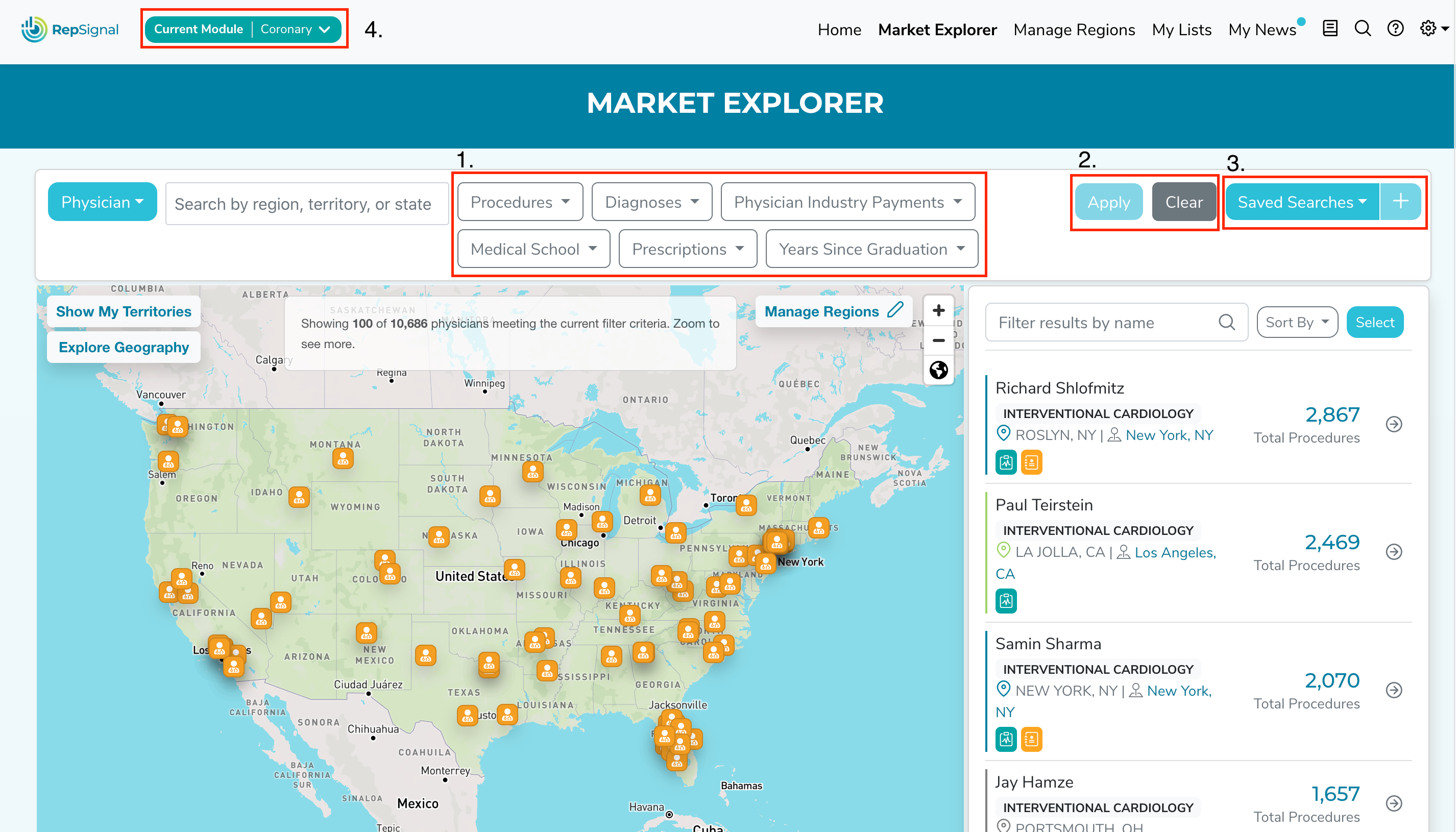
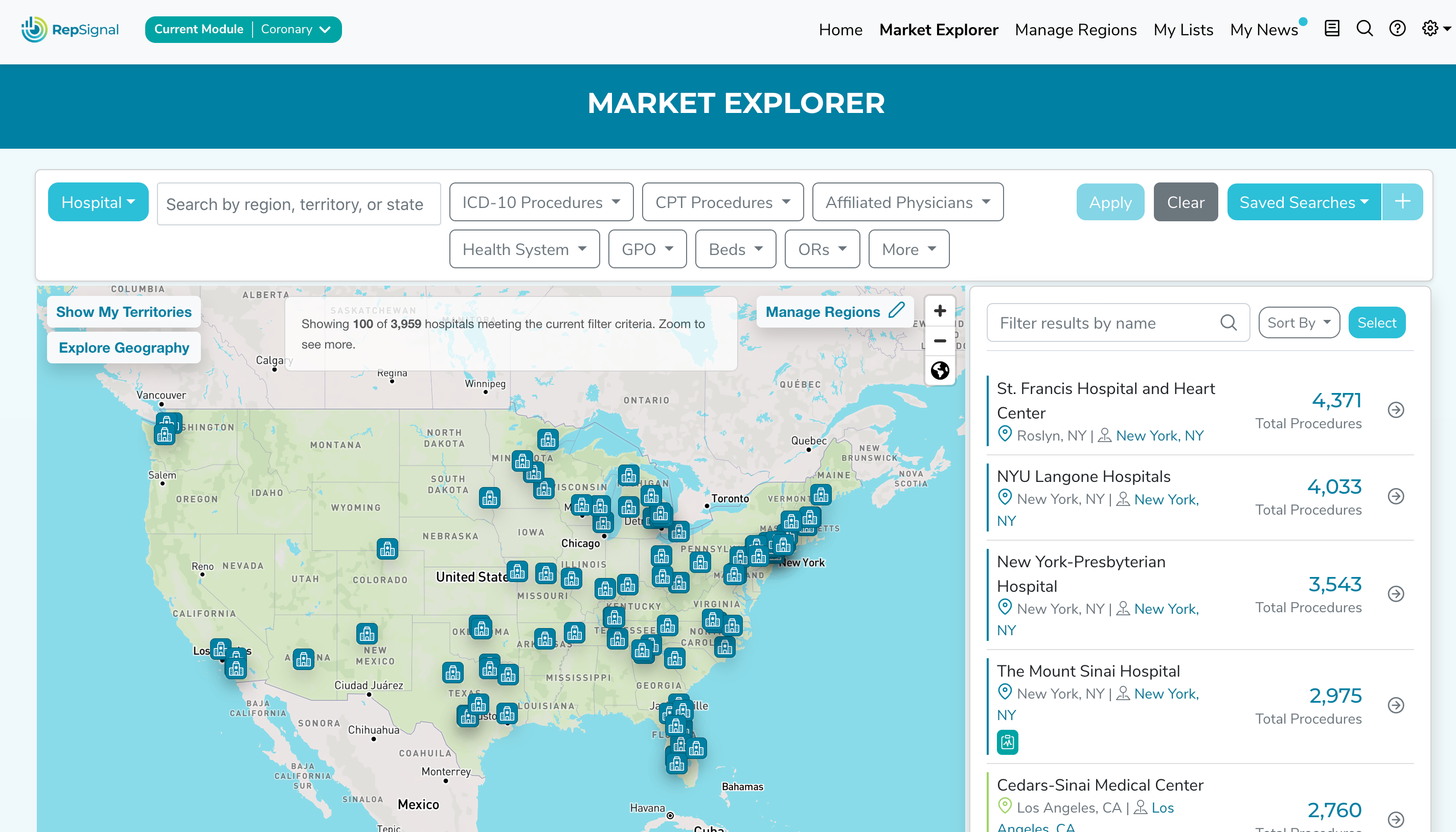
❗ New Feature: Physician & Hospital Advanced Filtering
You can now use advanced filters to quickly identify target subsegments on Market Explorer!
Filters available:
Filter Physicians by CPT procedures, diagnoses, industry payments, prescriptions, medical schools, and years in practice
Filter Hospitals by CPT or ICD-10 procedures, affiliated physicians, health system, GPO, services provided, accreditations, number of beds, number of ORs, or payer mix
Apply & Clear Filters: After you’ve selected your filters, the apply button will turn blue for you to click & submit your query. Use the clear button to remove all filters.
Saving Searches: If you’d like to save a filter you made you can click the “+” button in the top right. If you’d like to view one of your saved searches simply click on the saved searches dropdown in the upper right. You can also click on the trash icon in the dropdown to delete a saved search
Default filters: By default, the procedure and specialty filters from your selected procedure module will be applied
❕ On Market Explorer we removed the results limit dropdown
Now, the Market Explorer map will default to show 100 items
As always to see more items, zoom in
❕ We added the ability to select all items on Market Explorer - just click “select all” and then follow the prompt to select all items
What’s New in the Salesforce Integrated RepSignal App
❕ We made some refinements to advanced filters:
1. Advanced filters are now available for all license types
2. The hospital “Number of Beds” & “Number of ORs” filters relocated from the “More Filters” modal to the primary filter bar
3. The hospital “Affiliated Physicians” filter is now called “Affiliated Physician Specialities”
❕ On the RepSignal app page, navigating to a record page will open the record in a new tab by default
Note that this is only for linked records
❕ Across the app, lists of physicians are now sortable
Just select what variable you’d like to sort by from the available dropdown
❕ The "Linked" column in the Market Explorer table now shows more detail about what types of records are linked - so you can easily see which targets already have open Contacts, Leads, Accounts, or Opportunities
❕ The hospital profile page in the RepSignal App now has a Similar Hospitals tab to include all of the similar hospitals to the target hospital
❕ When linking a record, you can now see the record Owner as well as related content such as Opportunities and Account Revenue to help decipher which record to link
❕ To prevent duplicates, we refined the logic for displaying a "create new record" button
❕ We added procedure set descriptions in the module details popover and My Account page in Salesforce. To set up your procedure set descriptions contact your RepSignal Account Manager!
❕ Linking any record will no longer overwrite any data in your current Contact, Account, Lead, or Opportunity
Bugs Fixed & Small Changes
We made some tweaks to the hide feature on Salesforce
We worked to make RepSignal faster