
V0.11
V0.11.0
November 2, 2022
What’s New
1. We updated physician-level data to include 2020 Medicare Procedures and Prescriptions.
Note that due to COVID-19, this data was not incorporated into the RepSignal Procedure Volume Estimates across the app.
You can view this additional 2020 data on the Physician Profile within the Medicare FFS Procedures Overview and Medicare Prescription Overview tables, as well as in the CPT Summary page and Drug Summary page (accessed through Search).
Additionally, we made some changes to the way we process this data to improve loading speeds across the platform.
2. Lists can now be viewed on a map.
Now, for any hospital or physician list created in RepSignal, click the “View on Map” button in the upper right corner of the table. This will bring in a map to the right of the table displaying all physicians or hospitals on the list across the US.
Note that filtering and searching within the table will be reflected on the map
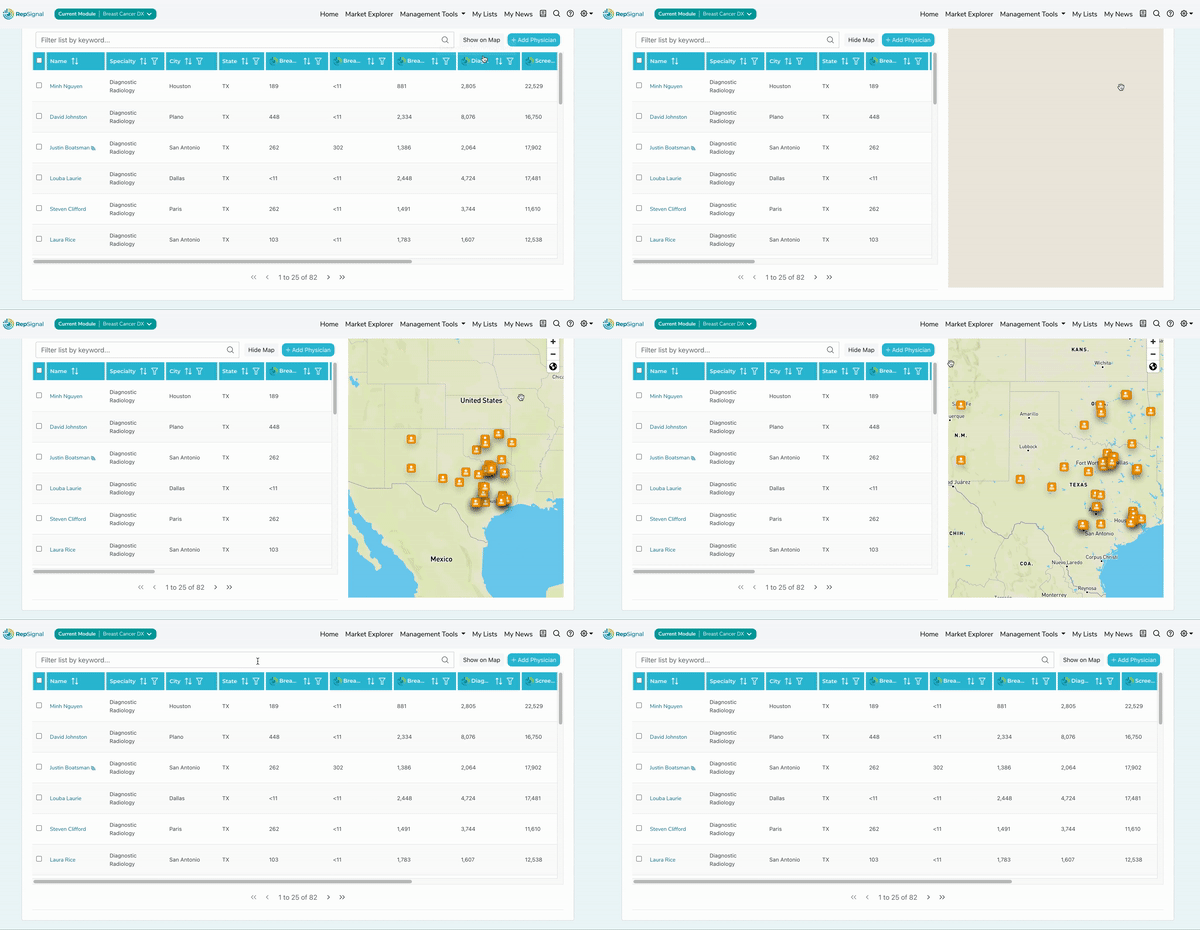
3. S2N can now create custom Physician and Hospitals Lists in RepSignal for customers from offline analyses
As an add-on service, S2N can now create custom Physician and Hospitals Lists in RepSignal for customers from offline analyses
For more information or if you’re interested in an offline analysis, reach out to your RepSignal Account Representative to speak further about this!
4. We improved table filtering and visuals
Tables are now mobile-enabled
Tables now abide by a default row height for a more consistent visual experience
Categorical filters in tables can now be searched
Date filters in tables are now enabled
5. Tweets in My News now indicate if the content is a Retweet
We also implemented a profanity filter to keep irrelevant Tweets out of My News
Smaller Changes
Upon exporting Hospital and Physician Lists, users will now get a confirmation modal to ensure this is the action they want to take
We moved the export button in the Physician and Hospital List pages to the top right of the header
We moved the “Add Hospital” and “Add Physician” buttons within Hospital and Physician Lists to the top right of the List
We removed the territory limitation on the “Add Hospital” and “Add Physician” buttons within Hospital and Physician Lists for non-leader accounts
Note: leader accounts never had this limitation
We removed some query terms (AND and OR) from the keywords list on the My Account page
We reformatted hospital names into Title text
We removed the amount paid column from the Research Payments Where Physician was the Primary Investigator in the Physician Profile
We made the placeholder text for a table with no data more consistently styled
Bugs Fixed
Search Hospital by location was returning inaccurate results, which we fixed
The map panel on Market Explorer was experiencing some bugs when using the Limit to Top Results slider, so we fixed that