
V0.10
V0.10.0
October 12, 2022
What’s New
1. New Feature: RepSignal Recommended Hospitals & RepSignal Recommended Physicians
In this release, we added RepSignal Recommended Hospitals & RepSignal Recommended Physicians to every List in RepSignal. Now, when you create a List in RepSignal, the List page has an option to “Get Recommended Hospitals” or “Get Recommended Physicians.” RepSignal will analyze the hospitals or physicians on the list, and recommend other similar hospitals or physicians based on key characteristics such as procedure mix, prescription mix, and industry involvement for physicians, and procedure mix, resources (like beds and ORs), and personnel (affiliate physicians, nurses, etc) for hospitals. Once found, you can add these Recommended Hospitals or Recommended Physicians to your list by checking the box on the left of the table and then clicking the “Add Items” button in the top right of the table.
Users who are assigned a territory will by default be shown results within the defined geography, but can switch to see recommendations across the whole US using the toggle in the top right of the table
Users can opt to hide the RepSignal Recommended Hospitals or RepSignal Recommended Physicians by clicking the “Hide” button in the top right
If the contents of a list change, users will have the option to refresh the list of recommendations using the “Refresh” button in the top right
2. Feature Update: Searching, Sorting, Filtering, Pagination, and Styling in Tables
In this release, we upgraded our tables by enabling searching, sorting, filtering, and pagination by default.
All tables now have a text-based search bar, enabling users to search for any text (including numbers) within a table. The search bar will auto-filter the table in real-time.
All columns in all tables (except action columns like ‘delete’ or ‘add’) are now sortable, with numeric columns sorting descending by default and all other columns sorting ascending by default. To filter, users can click the sort icon in the column header.

Above: sort icon in column headers
All numeric and most categorical columns in all tables are now filterable. To filter, users can click the filter icon in the column header, select their desired parameters, and click “Apply”. Parameters can now include things like State, County, Manufacturer, and more. Multiple filters can be applied at a given time. To clear filters on a table, users can click the “Clear Filters” button that appears above the table on the right.

Above: filter icon in column headers, “Clear Filters” button
All tables are paginated by default if there are more than 25 items in a table. Users can click between pages using the page navigation below the table.

Above: Example of page navigation below table
All tables now have a default style and consistent behavior where columns are aligned properly, and additional columns are accessible via scroll. We also made the right-most columns frozen when they represent Totals or Actions.
3. Feature Update: Bulk Delete or Copy to Other Lists
In the last release, we introduced Lists. In this release, we made some updates to user interactions with lists - namely allowing users to bulk delete items and bulk swap lists.
To bulk delete, users can select items to delete from a list with the checkboxes on the left side of the list, then click the trash can icon. Users will be prompted to confirm the deletion before completing the action.

Above: trash can “delete” icon
To bulk copy to other lists, users can select items to copy from a list with the checkboxes on the left side of the list, then click the “Add to List” button. Users can choose which existing lists to add the selected items to, and then click “Add.”
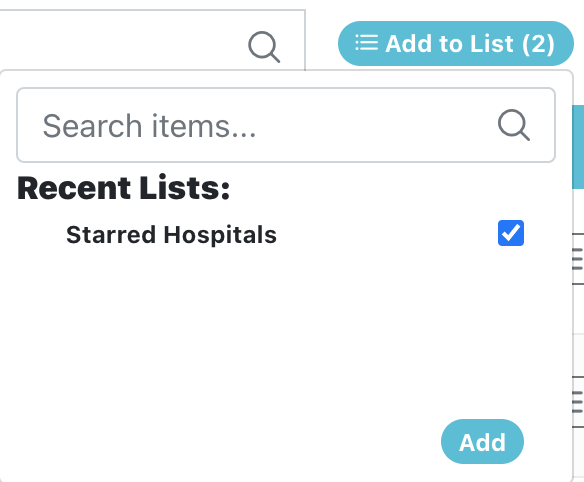
Above: Add to List button and existing lists selector
4. Feature Update: Export
Currently, users can export lists. Prior to this release, we limited the total amount of items possible to export in a single instance to 50. In this release, we expanded this to 500.
Bugs Fixed
We refactored a variety of data storage mechanisms to make RepSignal work faster!
We updated the way we calculate “Relevant Procedures” for a Region to ensure no procedures are double counted.
We fixed the default sorting order of Lists to be descending by Last Edited, placing your most recent lists at the top.
We limited the number of Territories listed in the Region side panel on Market Explorer, to avoid text overflow.
We noticed specific CPT codes were breaking the Territory Optimizer, so we fixed this bug.
Certain hospitals were missing addresses when using the Search function, so we fixed this bug.
We made Territory indicators into badges in the Physician and Hospital side panels on Market Explorer.
Our Market Explorer side panel was mistakenly appearing below the map in certain situations, so we fixed this bug.